Forum | | | | | 
Georg
Teles | Korrigiere gerade eines meiner Tools 1Click-Screenshot, wobei hier das TrayIcon angeklickt wird und stelle beim Testen fest, der normale Linksklick und Rechtsklick unter Windows 11 garnicht reagieren ... Doppelklicks auch nicht.
Windows 11 reagiert offensichtlich nur beim Loslassen, alle Quelltexte also beim Anklicken mit Messages $201 (Maus links anklicken) / $204 (Maus rechts anklicken) sind somit mit $202 (Maus links loslassen) / $205 (Maus rechts loslassen) zu ersetzen. Habs unter Windows XP, 7, 8, 10 und 11 getestet, das geht. Der doppelklick allerdings ist mir unter Windows 11 nicht bekannt.
Habe jetzt nicht in der Tiefe gebohrt, aber ... Windows 11 reagiert beim Mittleren Mausklick mit Message des linken Mausklicks (loslassen) mit der Message $202 (514) 
Ansonsten sind die durchgestrichenen Messages unter 11 nicht aktuell
TrayIcon("Msg", N1):
$201 (513): Linke Maustaste gedrückt
$202 (514): Linke Maustaste losgelassen
$203 (515): Doppelklick mit linker Maustaste
$204 (516): Rechte Maustaste gedrückt
$205 (517): Rechte Maustaste losgelassen
$206 (518): Doppelklick mit rechter Maustaste
$207 (519): Mittlere Maustaste gedrückt
$208 (520): Mittlere Maustaste losgelassen
$209 (521): Doppelklick mit mittlerer Maustaste
Grüße |
| | | | | | |
| | 
H.Brill | Da scheint wirklich was bei WIN11 geändert worden zu sein.
Mein Programm von damals läuft auch nicht mehr, wie es soll.
Lediglich wm_LButtonDown bzw. wm_RButtonDown wird noch
erkannt.
Declare Long MNummer[], ende, pos, String MString[]
MNummer[0] = $0201 : MString[0] = "wm_LButtonDown"
MNummer[1] = $0202 : MString[1] = "wm_LButtonUp"
MNummer[2] = $0204 : MString[2] = "wm_RButtonDown"
MNummer[3] = $0205 : MString[3] = "wm_RButtonUp"
MNummer[4] = $0207 : MString[4] = "wm_MButtonDown"
MNummer[5] = $0208 : MString[5] = "wm_MButtonUp"
MNummer[6] = $20A  : MString[6] = "Mausrad"
MNummer[7] = $000F : MString[7] = "WM_PAINT"
MNummer[8] = $0214 : MString[8] = "WM_SIZING"
MNummer[9] = $0203  : MString[9] = "Maus - Doppel - Klick"
ende = 0
'UserMessages $201, $202, $203, $204, $205, $207, $208, $20A, $000F, $0214, $10
Window 600, 400

WhileNot ende

    WaitInput
    pos = IndexOf(MNummer[], %Message, 0)

    If pos > - 1

        Locate 10, 2
        Print Space$(50)
        Locate 10, 2
        Print MString[pos], Hex$(MNummer[pos])

    EndIf

    If %Message = $10

        ende = 1

    EndIf

EndWhile

End
Mit den UserMessages scheint es aber zu gehen :
Declare Long MNummer[], ende, pos, String MString[]
MNummer[0] = $0201 : MString[0] = "wm_LButtonDown"
MNummer[1] = $0202 : MString[1] = "wm_LButtonUp"
MNummer[2] = $0204 : MString[2] = "wm_RButtonDown"
MNummer[3] = $0205 : MString[3] = "wm_RButtonUp"
MNummer[4] = $0207 : MString[4] = "wm_MButtonDown"
MNummer[5] = $0208 : MString[5] = "wm_MButtonUp"
MNummer[6] = $20A  : MString[6] = "Mausrad"
MNummer[7] = $000F : MString[7] = "WM_PAINT"
MNummer[8] = $0214 : MString[8] = "WM_SIZING"
MNummer[9] = $0203  : MString[9] = "Maus - Doppel - Klick"
ende = 0
Window 600, 400
UserMessages $201, $202, $203, $204, $205, $207, $208, $20A, $000F, $0214

WhileNot ende

    WaitInput

    If %Message = %UMessage

        pos = IndexOf(MNummer[], %UMessage, 0)

        If pos > -1

            Locate 10, 2
            Print Space$(50)
            Locate 10, 2
            Print MString[pos], Hex$(MNummer[pos])

        EndIf

    EndIf

    If %Message = $10

        ende = 1

    EndIf

EndWhile

End
Für die Doppelklicks wäre das hier zu verwenden :
Gefunden hier im Forum. |
| | | | Benutze XPROFAN X3 + FREEPROFAN
Wir sind die XProfaner.
Sie werden von uns assimiliert.
Widerstand ist zwecklos!
Wir werden alle ihre Funktionen und Algorithmen den unseren hinzufügen.
Was die Borg können, können wir schon lange. | 30.03.2025 ▲ |
| | |
| |
H.Brill | Ah, habe gerade gesehen, daß ich noch Windows 10 drauf habe.
Müßtest du halt mal mit Ver 11 probieren. |
| | | | Benutze XPROFAN X3 + FREEPROFAN
Wir sind die XProfaner.
Sie werden von uns assimiliert.
Widerstand ist zwecklos!
Wir werden alle ihre Funktionen und Algorithmen den unseren hinzufügen.
Was die Borg können, können wir schon lange. | 30.03.2025 ▲ |
| | |
| |
Georg
Teles | Hi,
die Messages funktionieren im Fenster einwandfrei bei Win 11, lediglich auf dem TrayIcon wie oben beschrieben reagiert Win 11 nur mit Loslassen der Linken/Rechten Maustaste statt gedrückter (mittlere Maustaste garnicht oder interpretiert als Linksklick/Loaslassen) - auf Doppelklicks reagiert das TrayIcon unter Win 11 absolut nicht.
Bis Win 10 ist hierbei alles tip top 
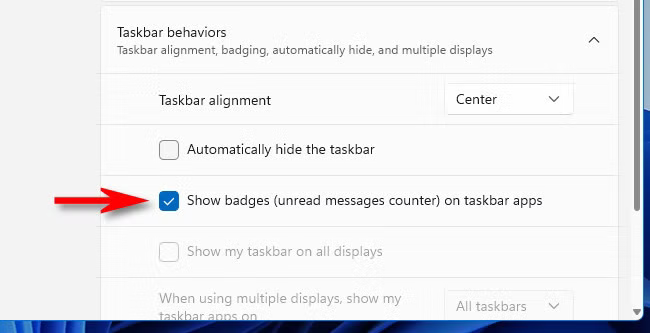
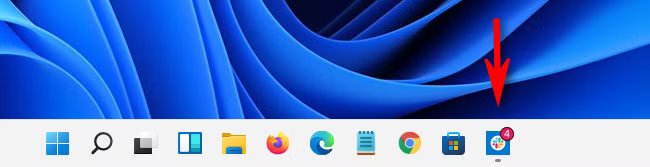
Ich vermute, dass bei Win 11 "Badges" dazukamen, z.B. wie bei Handys unter Email-App die Anzahl ungelesener Mails als Beispiel s. [...]  . Möglicherweise hat sich an der Messagesierung (hehe) unter Win 11 deshalb was geändert hat ? Habe da absolut keine Ahnung, was das unter Win 11 angeht... . Möglicherweise hat sich an der Messagesierung (hehe) unter Win 11 deshalb was geändert hat ? Habe da absolut keine Ahnung, was das unter Win 11 angeht...
Grüße |
| | | | | | |
| |
H.Brill | Nunja, die Badges gibt es ja auch schon in Windows 10. Bei mir sind sie aktiviert.
Sehe sie ja selber ab und an in der Taskleiste.
Windows 10: Badges in Taskleiste aktivieren / deaktivieren
Um die Badges in der Windows-10-Taskleiste zu aktivieren, geht ihr folgendermaßen vor:
Öffnet die Windows-Einstellungen mit der Tastenkombination Windows + i.
Klickt auf die Schaltfläche Personalisierung und wählt links den Menüpunkt Taskleiste aus.
Scrollt etwas herunter.
Stellt den Schalter bei Badges auf Taskleisten-Schaltflächen anzeigen von Aus auf Ein, um sie zu aktivieren.
Falls der Schalter bereits auf Ein steht, könnt ihr ihn betätigen, um die Badges zu deaktivieren.
Müßtest du dann ja auch zum Testen deaktivieren können. |
| | | | Benutze XPROFAN X3 + FREEPROFAN
Wir sind die XProfaner.
Sie werden von uns assimiliert.
Widerstand ist zwecklos!
Wir werden alle ihre Funktionen und Algorithmen den unseren hinzufügen.
Was die Borg können, können wir schon lange. | 02.04.2025 ▲ |
| | |
| |
Georg
Teles | Alsoo...
ich hab das mit Badges getestet unter Windows 11, deaktiviert, TrayIcon geht trotzdem nicht, aktiviert, das gleiche.
Es scheint, dass das Message-Management bei Windows 11 veränert wurde s.o.: (zumindest bei TrayIcon)
TrayIcon("Msg", N1):
$201 (513): Linke Maustaste gedrückt
$202 (514): Linke Maustaste losgelassen
$203 (515): Doppelklick mit linker Maustaste
$204 (516): Rechte Maustaste gedrückt
$205 (517): Rechte Maustaste losgelassen
$206 (518): Doppelklick mit rechter Maustaste
$207 (519): Mittlere Maustaste gedrückt
$208 (520): Mittlere Maustaste losgelassen
$209 (521): Doppelklick mit mittlerer Maustaste
Da komme ich gerade nicht dahinter, ich nutze immernoch Win 10 und halte von 11 erst einmal Abstand (weil gewisse Treiber), bis der Support (bald) nicht mehr geht.
Grüße
Georg |
| | | | | | |
| |  | ggf. Shell-Version prüfen (DllGetVersion, Verhalten soll erst ab SHELL32.dll >= 10.0.22000.1 betroffen sein), sodass das TrayIcon-HWND sichtbar sein muss oder zumindest als ToolWindow (SetWindowLong(hWnd, GWL_EXSTYLE, WS_EX_TOOLWINDOW)) erzeugt worden sein soll.
Probiere mal WM_USER(+X) als CallbackMessage und evaluiere das lParam explizit (z.B. NIN_SELECT, NIN_KEYSELECT)(, anstelle von klassischen WM_LBUTTONDOWN).
Vielleicht bringt das was. |
| | | | | | |
| | 
Jens-Arne
Reumschüssel | 
Ich habe eine Lösung für das Problem ausgearbeitet. Es werden mit reinem (und nicht mal langem) XProfan-Code "native" TrayIcons erzeugt, also unter Nutzung der Windows-API ohne die offenbar veralteten TrayIcon-Funktionen von XProfan.
Die API kann noch mehr (Balloon-ToolTips z.B.), aber das habe ich mir mal gespart. Es können TrayIcons erzeugt, modifiziert und entfernt werden - auch mehrere innerhalb eines einzelnen Programms. Sie reagieren auf alle bekannten Messages auch unter Windows 11 so wie früher, auch bei verborgenem Hauptfenster. Dazu muss eine UserMessage im MessageLoop auf eine "Callback"-Funktion gelenkt werden. Es ist alles im Code dokumentiert, auch die etwas umfangreicheren Parameter für die Erzeugung und Modifizierung von TrayIcons, wobei man einige davon auch weglassen kann, wenn man es so einfach wie früher haben möchte. Das sollte alles selbsterklärend und tatsächlich wirklich einfach sein.
STRUCT S_NOTIFYICONDATAA=cbSize&,hWnd&,uID&,uFlags&,uCallbackMessage&,hIcon&,szTip$(128),dwState&,dwStateMask&,szInfo$(256),uTimeout&,szInfoTitle$(64),dwInfoFlags&,guidItem$(16),hBalloonIcon&

Declare _Ende% 'für das Messagehandling (Programmende)
Declare _hIcon% 'hier speichern wir das Handle des Icons, das für das TrayIcon benutzt wird
Declare _XTrayMsg&[65525] 'Messages (z.B. von der Maus) für alle 65525 für ein gegebenes Programm möglichen XTrayIcons (kann man auf einen sinnvollen Wert verkleinern, z.B. 1, wenn man nicht mehr als ein TrayIcon erzeugen möchte)

Cls
Usermessages $10 'diese UserMessage fängt den Programm-Schließen-Button ab
UserMessages $8D00 'an diese UserMessage werden z.B. Mausmessages auf erzeugten TrayIcons weitergeleitet
Print "XTrayIcon-Testprogramm"

PROC XTrayIconAdd
  Parameters hWnd&,hIcon&,uID&,ToolTip$,SharehIcon& 'die drei letzten Parameter können weggelassen werden (dann uID&=1, ToolTip$="" und SharehIcon&=0)
  'hWnd&: Handle des Fensters, auf dem das TrayIcon erzeugt wird
  'hIcon: Handle zu einem Icon
  'uID&: The application-defined identifier of the taskbar icon. The Shell uses (hWnd plus uID) to identify which icon to operate on when Shell_NotifyIcon is invoked. You can have multiple icons associated with a single hWnd by assigning each a different uID.
  '  --> diese uID& (normalerweise 1,2,3,...,65535 für ein gegebenes Programm, wenn es mehrere TrayIcons benutzt) muss man sich merken, um das TrayIcon mit anderen Funktionen wieder ansprechen zu können (z.B. zum Löschen)
  'ToolTip$: wird angezeigt, wenn der Mauszeiger über dem Icon in der Traybar hovert (darf maximal 127 Zeichen lang sein - der Rest wird von dieser PROC automatisch abgeschnitten)
  'SharehIcon&: 1=hIcon& wird auch von anderen TrayIcons benutzt, 0=das passiert nicht
  Declare ShellIconData#,pc%
  '{ 'weglassbare Parameter bearbeiten
  pc%=%PCount
  if pc%=4
    SharehIcon&=0
  elseif pc%=3
    SharehIcon&=0
    ToolTip$=""
  elseif pc%=2
    SharehIcon&=0
    ToolTip$=""
    uID&=1
  endif
  '}
  Dim ShellIconData#,S_NOTIFYICONDATAA
  ShellIconData#.cbSize&=@SizeOf(S_NOTIFYICONDATAA)
  ShellIconData#.hWnd&=hWnd&
  ShellIconData#.uID&=uID&
  ShellIconData#.uFlags&=1+2+4+8+$80
    /*
    NIF_MESSAGE (0x00000001)
    0x00000001. The uCallbackMessage member is valid.
    NIF_ICON (0x00000002)
    0x00000002. The hIcon member is valid.
    NIF_TIP (0x00000004)
    0x00000004. The szTip member is valid.
    NIF_STATE (0x00000008)
    0x00000008. The dwState and dwStateMask members are valid.
    NIF_INFO (0x00000010)
    0x00000010. Display a balloon notification. The szInfo, szInfoTitle, dwInfoFlags, and uTimeout members are valid. Note that uTimeout is valid only in Windows 2000 and Windows XP.
    To display the balloon notification, specify NIF_INFO and provide text in szInfo.
    To remove a balloon notification, specify NIF_INFO and provide an empty string through szInfo.
    To add a notification area icon without displaying a notification, do not set the NIF_INFO flag.
    NIF_GUID (0x00000020)
    0x00000020.
    Windows 7 and later: The guidItem is valid.
    Windows Vista and earlier: Reserved.
    NIF_REALTIME (0x00000040)
    0x00000040. Windows Vista and later. If the balloon notification cannot be displayed immediately, discard it. Use this flag for notifications that represent real-time information which would be meaningless or misleading if displayed at a later time. For example, a message that states "Your telephone is ringing." NIF_REALTIME is meaningful only when combined with the NIF_INFO flag.
    NIF_SHOWTIP (0x00000080)
    0x00000080. Windows Vista and later. Use the standard tooltip. Normally, when uVersion is set to NOTIFYICON_VERSION_4, the standard tooltip is suppressed and can be replaced by the application-drawn, pop-up UI. If the application wants to show the standard tooltip with NOTIFYICON_VERSION_4, it can specify NIF_SHOWTIP to indicate the standard tooltip should still be shown.
    */
  ShellIconData#.uCallbackMessage&=$8D00
    /*
    An application-defined message identifier. The system uses this identifier to send notification messages to the window identified in hWnd. These notification messages are sent when a mouse event or hover occurs in the bounding rectangle of the icon, when the icon is selected or activated with the keyboard, or when those actions occur in the balloon notification.
    When the uVersion member is either 0 or NOTIFYICON_VERSION, the wParam parameter of the message contains the identifier of the taskbar icon in which the event occurred. This identifier can be 32 bits in length. The lParam parameter holds the mouse or keyboard message associated with the event. For example, when the pointer moves over a taskbar icon, lParam is set to WM_MOUSEMOVE.
    When the uVersion member is NOTIFYICON_VERSION_4, applications continue to receive notification events in the form of application-defined messages through the uCallbackMessage member, but the interpretation of the lParam and wParam parameters of that message is changed as follows:
      LOWORD(lParam) contains notification events, such as NIN_BALLOONSHOW, NIN_POPUPOPEN, or WM_CONTEXTMENU.
      HIWORD(lParam) contains the icon ID. Icon IDs are restricted to a length of 16 bits.
      GET_X_LPARAM(wParam) returns the X anchor coordinate for notification events NIN_POPUPOPEN, NIN_SELECT, NIN_KEYSELECT, and all mouse messages between WM_MOUSEFIRST and WM_MOUSELAST. If any of those messages are generated by the keyboard, wParam is set to the upper-left corner of the target icon. For all other messages, wParam is undefined.
      GET_Y_LPARAM(wParam) returns the Y anchor coordinate for notification events and messages as defined for the X anchor.
    */
  ShellIconData#.hIcon&=hIcon& 'A handle to the icon to be added, modified, or deleted. Windows XP and later support icons of up to 32 BPP. If only a 16x16 pixel icon is provided, it is scaled to a larger size in a system set to a high dpi value. This can lead to an unattractive result. It is recommended that you provide both a 16x16 pixel icon and a 32x32 icon in your resource file. Use LoadIconMetric to ensure that the correct icon is loaded and scaled appropriately. See Remarks for a code example.
  ShellIconData#.szTip$=@left$(ToolTip$,127)
  If SharehIcon&=0
    ShellIconData#.dwState&=0 '1=the icon is hidden; 2=the icon resource is shared between multiple icons
    ShellIconData#.dwStateMask&=2
  Else
    ShellIconData#.dwState&=2 '1=the icon is hidden; 2=the icon resource is shared between multiple icons
    ShellIconData#.dwStateMask&=2
  Endif
  ShellIconData#.szInfo$="" 'A null-terminated string that specifies the text to display in a balloon notification. It can have a maximum of 256 characters, including the terminating null character, but should be restricted to 200 characters in English to accommodate localization. To remove the balloon notification from the UI, either delete the icon (with NIM_DELETE) or set the NIF_INFO flag in uFlags and set szInfo to an empty string.
  ShellIconData#.uTimeout&=10 'The timeout value, in milliseconds, for balloon notification. The system enforces minimum and maximum timeout values. Values specified in uTimeout that are too large are set to the maximum value. Values that are too small default to the minimum value. The system minimum and maximum timeout values are currently set at 10 seconds and 30 seconds, respectively. See Remarks for further discussion of uTimeout.
  ShellIconData#.szInfoTitle$="" 'A null-terminated string that specifies a title for a balloon notification. This title appears in a larger font immediately above the text. It can have a maximum of 64 characters, including the terminating null character, but should be restricted to 48 characters in English to accommodate localization.
  ShellIconData#.dwInfoFlags&=0 'Flags that can be set to modify the behavior and appearance of a balloon notification. The icon is placed to the left of the title. If the szInfoTitle member is zero-length, the icon is not shown.
  ShellIconData#.guidItem$="" 'wir benutzen die GUID-Funktionalität nicht
  ShellIconData#.hBalloonIcon&=0 'The handle of a customized notification icon provided by the application that should be used independently of the notification area icon. If this member is non-NULL and the NIIF_USER flag is set in the dwInfoFlags member, this icon is used as the notification icon. If this member is NULL, the legacy behavior is carried out.
  @External("Shell32.dll","Shell_NotifyIconA",0,ShellIconData#)
  Dispose ShellIconData#
ENDPROC 'XTrayIconAdd

PROC XTrayIconModify
  Parameters hWnd&,hIcon&,uID&,ToolTip$,SharehIcon& 'die drei letzten Parameter können weggelassen werden (dann uID&=1, ToolTip$="" und SharehIcon&=0)
  'alle Parameter sind so wie bei XTrayIconAdd, nur dass uID& ein schon bestehendes TrayIcon bezeichnen muss
  Declare ShellIconData#,pc%
  '{ 'weglassbare Parameter bearbeiten
  pc%=%PCount
  if pc%=4
    SharehIcon&=0
  elseif pc%=3
    SharehIcon&=0
    ToolTip$=""
  elseif pc%=2
    SharehIcon&=0
    ToolTip$=""
    uID&=1
  endif
  '}
  Dim ShellIconData#,S_NOTIFYICONDATAA
  ShellIconData#.cbSize&=@SizeOf(S_NOTIFYICONDATAA)
  ShellIconData#.hWnd&=hWnd&
  ShellIconData#.uID&=uID&
  ShellIconData#.uFlags&=1+2+4+8+$80
  ShellIconData#.uCallbackMessage&=$8D00
  ShellIconData#.hIcon&=hIcon&
  ShellIconData#.szTip$=@left$(ToolTip$,127)
  If SharehIcon&=0
    ShellIconData#.dwState&=0
    ShellIconData#.dwStateMask&=2
  Else
    ShellIconData#.dwState&=2
    ShellIconData#.dwStateMask&=2
  Endif
  ShellIconData#.szInfo$=""
  ShellIconData#.uTimeout&=10
  ShellIconData#.szInfoTitle$=""
  ShellIconData#.dwInfoFlags&=0
  ShellIconData#.guidItem$=""
  ShellIconData#.hBalloonIcon&=0
  @External("Shell32.dll","Shell_NotifyIconA",1,ShellIconData#)
  Dispose ShellIconData#
ENDPROC 'XTrayIconModify

PROC XTrayIconDelete
  Parameters hWnd&,uID& 'uID& kann weggelassen werden, dann =1
  'hWnd&: das Fenster, auf dem das zu löschende TrayIcon erstellt wurde
  'uID&: die uID, die bei der Erstellung des zu löschenden TrayIcons angegeben wurde
  Declare ShellIconData#,pc%
  '{ 'weglassbare Parameter bearbeiten
  pc%=%PCount
  if pc%=1
    uID&=1
  endif
  '}
  Dim ShellIconData#,S_NOTIFYICONDATAA
  ShellIconData#.cbSize&=@SizeOf(S_NOTIFYICONDATAA)
  ShellIconData#.hWnd&=hWnd&
  ShellIconData#.uID&=uID&
  @External("Shell32.dll","Shell_NotifyIconA",2,ShellIconData#)
  Dispose ShellIconData#
ENDPROC 'XTrayIconDelete

PROC HandleTrayIconCallback
  Parameters wParam&,lParam&
  'in wParam ist die bei Erstellung des TrayIcons angegebene uID enthalten, in lParam die Message, die z.B. die Maus auf dem Icon erzeugt hat
  _XTrayMsg&[wParam&]=lParam&
ENDPROC 'HandleTrayIconCallback


'_hIcon%=@Create("hIcon","xyz.ico oder xyz.dll oder xyz.exe",0)
_hIcon%=@Create("hIcon","GESICHT") 'nimmt den gelben "Smiley" aus den XProfan-internen Icons

@XTrayIconAdd(%HWnd,_hIcon%,1,"Tooltip zum TrayIcon-Beispielprogramm",0)
'@XTrayIconModify(%HWnd,_hIcon%,1,"Dies ist KEIN Tooltip.",0)

@MessageBox("Das Hauptfenster wird jetzt verborgen. Das ist genau die Situation, in der unter Windows 11 die alten TrayIcon-Funktionen von XProfan nicht mehr funktionieren.\n\nDieses Programm kann mit einem Doppelklick auf den gelben Smiley in der Traybar wieder hervorgeholt werden.","Meldung",0)
@ShowWindow(%HWnd,0)

_Ende%=0
WhileNot _Ende%
  WaitInput
  If %uMessage=$8D00 '!!! DAS HIER MUSS IM MESSAGEHANDLING ENTHALTEN SEIN !!!
    @HandleTrayIconCallback(&uwParam,&ulParam)
  EndIf
  'Das muss hier drüber mit endif abgeschlossen werden, damit danach _XTrayMsg&[uID&] ausgewertet werden kann.
  If @IsKey(27) or (%uMessage=$10) 'Programmende
    _Ende%=1
    While @iskey(27)
      sleep 25
    EndWhile
  ElseIf _XTrayMsg&[1]=513 'Linksklick auf das TrayIcon mit der uID 1
    Sound 500,360\4
    _XTrayMsg&[1]=0 'muss sein, damit das im nächsten Durchlauf des Messageloops nicht nochmal getriggert wird (ebenso bei allen anderen Message-Abfragen, die für einen relevant sind)
  ElseIf _XTrayMsg&[1]=515 'linker Doppelklick (leider wird vorher zugleich der einfache Linksklick getriggert, man kann also nur eines von beidem gleichzeitig sinnvoll verwenden)
    @ShowWindow(%HWnd,1)
    Sound 1000,360\4
    _XTrayMsg&[1]=0
  ElseIf _XTrayMsg&[1]=516 'Rechtsklick
    Sound 1500,360\4
    _XTrayMsg&[1]=0
    'XTrayIconDelete(%HWnd,1)
  ElseIf _XTrayMsg&[1]=519 'mittlere Maustaste gedrückt
    Sound 2000,360\4
    _XTrayMsg&[1]=0
  EndIf
EndWhile

XTrayIconDelete(%HWnd,1)

DeleteObject _hIcon%
UserMessages 0
End
Beste Grüße und frohes Fest, Jens-Arne |
| | | | XProfan X4 * Prf2Cpp * XPSE * JRPC3 * Win11 Pro 64bit * PC i7-7700K@4,2GHz, 32 GB RAM
PM: jreumsc@web.de | 24.12.2025 ▲ |
| | |
| |
Jens-Arne
Reumschüssel |
Dabei ist die Abfragelogik etwas verändert worden. Man muss jetzt in XTrayIconMsgDown bzw. XTrayIconMsgUp die Message angeben, die man testen möchte. Down und Up müssen getrennt verarbeitet werden, weil Up Down sonst sofort überschreiben würde, bevor man Down abfragen konnte.
STRUCT S_NOTIFYICONDATAA=cbSize&,hWnd&,uID&,uFlags&,uCallbackMessage&,hIcon&,szTip$(128),dwState&,dwStateMask&,szInfo$(256),uTimeout&,szInfoTitle$(64),dwInfoFlags&,guidItem$(16),hBalloonIcon&

Declare _Ende% 'für das Messagehandling (Programmende)
Declare _hIcon% 'hier speichern wir das Handle des Icons, das für das TrayIcon benutzt wird
Declare _XTrayMsgDown&[65525],_XTrayMsgUp&[65525] 'Messages (z.B. von der Maus) für alle 65525 für ein gegebenes Programm möglichen XTrayIcons (kann man auf einen sinnvollen Wert verkleinern, z.B. 1, wenn man nicht mehr als ein TrayIcon erzeugen möchte)

SUBCLASSPROC
  If &sWnd=%HWnd
    If %sMessage=$8D00
      If (&slParam=513) or (&slParam=515) or (&slParam=516) or (&slParam=518) or (&slParam=519) or (&slParam=521)
        _XTrayMsgDown&[&swParam]=&slParam 'in wParam ist die bei Erstellung des TrayIcons angegebene uID enthalten, in lParam die Message, die z.B. die Maus auf dem Icon erzeugt hat
        @SendMessage(%HWnd,$8000,0,0) 'WaitInput verlassen
        '@Set("WinProc",0)
      ElseIf (&slParam=514) or (&slParam=517) or (&slParam=520)
        _XTrayMsgUp&[&swParam]=&slParam 'in wParam ist die bei Erstellung des TrayIcons angegebene uID enthalten, in lParam die Message, die z.B. die Maus auf dem Icon erzeugt hat
        @SendMessage(%HWnd,$8000,0,0) 'WaitInput verlassen
        '@Set("WinProc",0)
      EndIf
    EndIf
  EndIf
ENDPROC 'SUBCLASSPROC

PROC XTrayIconAdd
  Parameters hWnd&,hIcon&,uID&,ToolTip$,SharehIcon& 'die drei letzten Parameter können weggelassen werden (dann uID&=1, ToolTip$="" und SharehIcon&=0)
  'hWnd&: Handle des Fensters, auf dem das TrayIcon erzeugt wird
  'hIcon: Handle zu einem Icon
  'uID&: The application-defined identifier of the taskbar icon. The Shell uses (hWnd plus uID) to identify which icon to operate on when Shell_NotifyIcon is invoked. You can have multiple icons associated with a single hWnd by assigning each a different uID.
  '  --> diese uID& (normalerweise 1,2,3,...,65535 für ein gegebenes Programm, wenn es mehrere TrayIcons benutzt) muss man sich merken, um das TrayIcon mit anderen Funktionen wieder ansprechen zu können (z.B. zum Löschen)
  'ToolTip$: wird angezeigt, wenn der Mauszeiger über dem Icon in der Traybar hovert (darf maximal 127 Zeichen lang sein - der Rest wird von dieser PROC automatisch abgeschnitten)
  'SharehIcon&: 1=hIcon& wird auch von anderen TrayIcons benutzt, 0=das passiert nicht
  Declare ShellIconData#,pc%
  '{ 'weglassbare Parameter bearbeiten
  pc%=%PCount
  if pc%=4
    SharehIcon&=0
  elseif pc%=3
    SharehIcon&=0
    ToolTip$=""
  elseif pc%=2
    SharehIcon&=0
    ToolTip$=""
    uID&=1
  endif
  '}
  Dim ShellIconData#,S_NOTIFYICONDATAA
  ShellIconData#.cbSize&=@SizeOf(S_NOTIFYICONDATAA)
  ShellIconData#.hWnd&=hWnd&
  ShellIconData#.uID&=uID&
  ShellIconData#.uFlags&=1+2+4+8+$80
    /*
    NIF_MESSAGE (0x00000001)
    0x00000001. The uCallbackMessage member is valid.
    NIF_ICON (0x00000002)
    0x00000002. The hIcon member is valid.
    NIF_TIP (0x00000004)
    0x00000004. The szTip member is valid.
    NIF_STATE (0x00000008)
    0x00000008. The dwState and dwStateMask members are valid.
    NIF_INFO (0x00000010)
    0x00000010. Display a balloon notification. The szInfo, szInfoTitle, dwInfoFlags, and uTimeout members are valid. Note that uTimeout is valid only in Windows 2000 and Windows XP.
    To display the balloon notification, specify NIF_INFO and provide text in szInfo.
    To remove a balloon notification, specify NIF_INFO and provide an empty string through szInfo.
    To add a notification area icon without displaying a notification, do not set the NIF_INFO flag.
    NIF_GUID (0x00000020)
    0x00000020.
    Windows 7 and later: The guidItem is valid.
    Windows Vista and earlier: Reserved.
    NIF_REALTIME (0x00000040)
    0x00000040. Windows Vista and later. If the balloon notification cannot be displayed immediately, discard it. Use this flag for notifications that represent real-time information which would be meaningless or misleading if displayed at a later time. For example, a message that states "Your telephone is ringing." NIF_REALTIME is meaningful only when combined with the NIF_INFO flag.
    NIF_SHOWTIP (0x00000080)
    0x00000080. Windows Vista and later. Use the standard tooltip. Normally, when uVersion is set to NOTIFYICON_VERSION_4, the standard tooltip is suppressed and can be replaced by the application-drawn, pop-up UI. If the application wants to show the standard tooltip with NOTIFYICON_VERSION_4, it can specify NIF_SHOWTIP to indicate the standard tooltip should still be shown.
    */
  ShellIconData#.uCallbackMessage&=$8D00
    /*
    An application-defined message identifier. The system uses this identifier to send notification messages to the window identified in hWnd. These notification messages are sent when a mouse event or hover occurs in the bounding rectangle of the icon, when the icon is selected or activated with the keyboard, or when those actions occur in the balloon notification.
    When the uVersion member is either 0 or NOTIFYICON_VERSION, the wParam parameter of the message contains the identifier of the taskbar icon in which the event occurred. This identifier can be 32 bits in length. The lParam parameter holds the mouse or keyboard message associated with the event. For example, when the pointer moves over a taskbar icon, lParam is set to WM_MOUSEMOVE.
    When the uVersion member is NOTIFYICON_VERSION_4, applications continue to receive notification events in the form of application-defined messages through the uCallbackMessage member, but the interpretation of the lParam and wParam parameters of that message is changed as follows:
      LOWORD(lParam) contains notification events, such as NIN_BALLOONSHOW, NIN_POPUPOPEN, or WM_CONTEXTMENU.
      HIWORD(lParam) contains the icon ID. Icon IDs are restricted to a length of 16 bits.
      GET_X_LPARAM(wParam) returns the X anchor coordinate for notification events NIN_POPUPOPEN, NIN_SELECT, NIN_KEYSELECT, and all mouse messages between WM_MOUSEFIRST and WM_MOUSELAST. If any of those messages are generated by the keyboard, wParam is set to the upper-left corner of the target icon. For all other messages, wParam is undefined.
      GET_Y_LPARAM(wParam) returns the Y anchor coordinate for notification events and messages as defined for the X anchor.
    */
  ShellIconData#.hIcon&=hIcon& 'A handle to the icon to be added, modified, or deleted. Windows XP and later support icons of up to 32 BPP. If only a 16x16 pixel icon is provided, it is scaled to a larger size in a system set to a high dpi value. This can lead to an unattractive result. It is recommended that you provide both a 16x16 pixel icon and a 32x32 icon in your resource file. Use LoadIconMetric to ensure that the correct icon is loaded and scaled appropriately. See Remarks for a code example.
  ShellIconData#.szTip$=@left$(ToolTip$,127)
  If SharehIcon&=0
    ShellIconData#.dwState&=0 '1=the icon is hidden; 2=the icon resource is shared between multiple icons
    ShellIconData#.dwStateMask&=2
  Else
    ShellIconData#.dwState&=2 '1=the icon is hidden; 2=the icon resource is shared between multiple icons
    ShellIconData#.dwStateMask&=2
  Endif
  ShellIconData#.szInfo$="" 'A null-terminated string that specifies the text to display in a balloon notification. It can have a maximum of 256 characters, including the terminating null character, but should be restricted to 200 characters in English to accommodate localization. To remove the balloon notification from the UI, either delete the icon (with NIM_DELETE) or set the NIF_INFO flag in uFlags and set szInfo to an empty string.
  ShellIconData#.uTimeout&=10 'The timeout value, in milliseconds, for balloon notification. The system enforces minimum and maximum timeout values. Values specified in uTimeout that are too large are set to the maximum value. Values that are too small default to the minimum value. The system minimum and maximum timeout values are currently set at 10 seconds and 30 seconds, respectively. See Remarks for further discussion of uTimeout.
  ShellIconData#.szInfoTitle$="" 'A null-terminated string that specifies a title for a balloon notification. This title appears in a larger font immediately above the text. It can have a maximum of 64 characters, including the terminating null character, but should be restricted to 48 characters in English to accommodate localization.
  ShellIconData#.dwInfoFlags&=0 'Flags that can be set to modify the behavior and appearance of a balloon notification. The icon is placed to the left of the title. If the szInfoTitle member is zero-length, the icon is not shown.
  ShellIconData#.guidItem$="" 'wir benutzen die GUID-Funktionalität nicht
  ShellIconData#.hBalloonIcon&=0 'The handle of a customized notification icon provided by the application that should be used independently of the notification area icon. If this member is non-NULL and the NIIF_USER flag is set in the dwInfoFlags member, this icon is used as the notification icon. If this member is NULL, the legacy behavior is carried out.
  @External("Shell32.dll","Shell_NotifyIconA",0,ShellIconData#)
  Dispose ShellIconData#
ENDPROC 'XTrayIconAdd

PROC XTrayIconModify
  Parameters hWnd&,hIcon&,uID&,ToolTip$,SharehIcon& 'die drei letzten Parameter können weggelassen werden (dann uID&=1, ToolTip$="" und SharehIcon&=0)
  'alle Parameter sind so wie bei XTrayIconAdd, nur dass uID& ein schon bestehendes TrayIcon bezeichnen muss
  Declare ShellIconData#,pc%
  '{ 'weglassbare Parameter bearbeiten
  pc%=%PCount
  if pc%=4
    SharehIcon&=0
  elseif pc%=3
    SharehIcon&=0
    ToolTip$=""
  elseif pc%=2
    SharehIcon&=0
    ToolTip$=""
    uID&=1
  endif
  '}
  Dim ShellIconData#,S_NOTIFYICONDATAA
  ShellIconData#.cbSize&=@SizeOf(S_NOTIFYICONDATAA)
  ShellIconData#.hWnd&=hWnd&
  ShellIconData#.uID&=uID&
  ShellIconData#.uFlags&=1+2+4+8+$80
  ShellIconData#.uCallbackMessage&=$8D00
  ShellIconData#.hIcon&=hIcon&
  ShellIconData#.szTip$=@left$(ToolTip$,127)
  If SharehIcon&=0
    ShellIconData#.dwState&=0
    ShellIconData#.dwStateMask&=2
  Else
    ShellIconData#.dwState&=2
    ShellIconData#.dwStateMask&=2
  Endif
  ShellIconData#.szInfo$=""
  ShellIconData#.uTimeout&=10
  ShellIconData#.szInfoTitle$=""
  ShellIconData#.dwInfoFlags&=0
  ShellIconData#.guidItem$=""
  ShellIconData#.hBalloonIcon&=0
  @External("Shell32.dll","Shell_NotifyIconA",1,ShellIconData#)
  Dispose ShellIconData#
ENDPROC 'XTrayIconModify

PROC XTrayIconDelete
  Parameters hWnd&,uID& 'uID& kann weggelassen werden, dann =1
  'hWnd&: das Fenster, auf dem das zu löschende TrayIcon erstellt wurde
  'uID&: die uID, die bei der Erstellung des zu löschenden TrayIcons angegeben wurde
  Declare ShellIconData#,pc%
  '{ 'weglassbare Parameter bearbeiten
  pc%=%PCount
  if pc%=1
    uID&=1
  endif
  '}
  Dim ShellIconData#,S_NOTIFYICONDATAA
  ShellIconData#.cbSize&=@SizeOf(S_NOTIFYICONDATAA)
  ShellIconData#.hWnd&=hWnd&
  ShellIconData#.uID&=uID&
  @External("Shell32.dll","Shell_NotifyIconA",2,ShellIconData#)
  Dispose ShellIconData#
ENDPROC 'XTrayIconDelete

PROC XTrayIconMsgDown
  Parameters Msg&,uID&
  Case %PCount=1: uID&=1
  If _XTrayMsgDown&[uID&]=Msg&
    _XTrayMsgDown&[uID&]=0
    Return Msg&
  EndIf
  Return 0
ENDPROC 'XTrayIconMsgDown

PROC XTrayIconMsgUp
  Parameters Msg&,uID&
  Case %PCount=1: uID&=1
  If _XTrayMsgUp&[uID&]=Msg&
    _XTrayMsgUp&[uID&]=0
    Return Msg&
  EndIf
  Return 0
ENDPROC 'XTrayIconMsgUp

Cls
Usermessages $10 'diese UserMessage fängt den Programm-Schließen-Button ab
Usermessages $8000 'diese UserMessage ist zum intentionalen Verlassen von WaitInput da
Print "XTrayIcon-Testprogramm"
Subclass %HWnd,1

'_hIcon%=@Create("hIcon","xyz.ico oder xyz.dll oder xyz.exe",0)
_hIcon%=@Create("hIcon","GESICHT") 'nimmt den gelben "Smiley" aus den XProfan-internen Icons

@XTrayIconAdd(%HWnd,_hIcon%,1,"Tooltip zum TrayIcon-Beispielprogramm",0)
'@XTrayIconModify(%HWnd,_hIcon%,1,"Dies ist KEIN Tooltip.",0)

@MessageBox("Das Hauptfenster wird jetzt verborgen. Das ist genau die Situation, in der unter Windows 11 die alten TrayIcon-Funktionen von XProfan nicht mehr funktionieren.\n\nDieses Programm kann mit einem Doppelklick auf den gelben Smiley in der Traybar wieder hervorgeholt werden.","Meldung",0)
@ShowWindow(%HWnd,0)

_Ende%=0
WhileNot _Ende%
  WaitInput
  If @IsKey(27) or (%uMessage=$10) 'Programmende
    _Ende%=1
    While @iskey(27)
      sleep 25
    EndWhile
  ElseIf @XTrayIconMsgDown(513,1) 'Linksklick auf das TrayIcon mit der uID 1
    'Sound 500,360\8 'auskommentiert, weil das den linken Doppelklick hier blockiert, weil es zu lange dauert
  ElseIf @XTrayIconMsgDown(515,1) 'linker Doppelklick (leider wird vorher zugleich der einfache Linksklick getriggert, man kann also nur eines von beidem gleichzeitig sinnvoll verwenden)
    @ShowWindow(%HWnd,1)
    Sound 1000,360\8
  ElseIf @XTrayIconMsgDown(516,1) 'Rechtsklick
    Sound 1500,360\8
  ElseIf @XTrayIconMsgDown(519,1) 'mittlere Maustaste gedrückt
    Sound 2000,360\8
  ElseIf @XTrayIconMsgUp(514,1) 'linke Maustaste losgelassen
    'Sound 2500,360\8 'auskommentiert, weil das den linken Doppelklick hier blockiert, weil es zu lange dauert
  EndIf
EndWhile

XTrayIconDelete(%HWnd,1)

Subclass %HWnd,0
DeleteObject _hIcon%
UserMessages 0
End
|
| | | | XProfan X4 * Prf2Cpp * XPSE * JRPC3 * Win11 Pro 64bit * PC i7-7700K@4,2GHz, 32 GB RAM
PM: jreumsc@web.de | 24.12.2025 ▲ |
| | |
| |
Georg
Teles | Heey genial,
bin noch nicht auf Win 11 umgestiegen, unter 10 habe ich aber getestet 
Grüße
Georg |
| | | | | | |
|
AntwortenThemenoptionen | 2.317 Betrachtungen |
ThemeninformationenDieses Thema hat 4 Teilnehmer: |
 (398)
(398)

 Deutsch
 English
 Français
 Español
 Italia